
A friend asked me a question recently that completely caught me off guard.
He said, “If someone stopped you on the road, collected your phone, opened your OPay app, and forced you to transfer all the money in your account, what would you do?”
I paused for a few seconds because, honestly, I didn’t have an answer.
My response was, “I guess I’d have no choice but to transfer the money.”
That’s when he showed me two OPay security features I had completely overlooked.
1. Emergency Lock
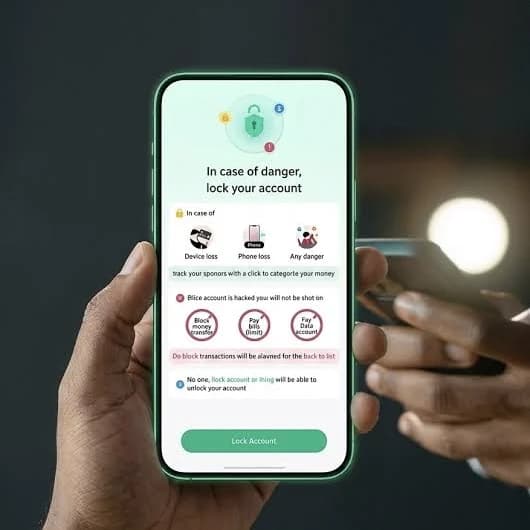
If your phone gets stolen or you suspect you’re in danger, you can use OPay’s Emergency Lock feature to instantly lock your account.
Once activated, your account is frozen for 24 hours, making it much harder for anyone to access your money.
It’s the kind of feature you hope you never need, but you’ll be glad it’s there if something goes wrong.
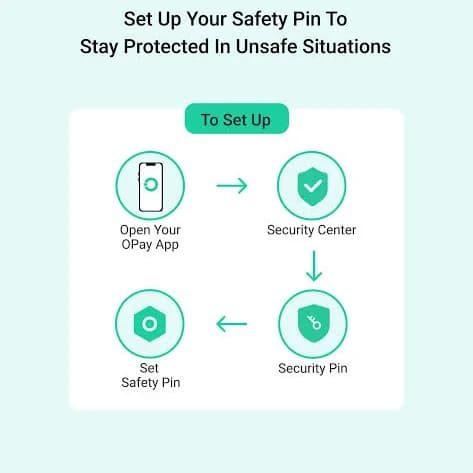
2. Safety PIN
This was the one that surprised me.
Imagine someone forces you to make a transfer. Instead of arguing or resisting, you can enter your Safety PIN while processing the transaction.
The Safety PIN is designed for situations where you’re being forced to authorise a transfer, adding an extra layer of protection when you can’t safely refuse.
Why You Should Set Them Up
Think of it this way:
- Emergency Lock helps when you notice the danger before someone gains access to your account.
- Safety PIN helps when the danger has already happened and you’re being forced to act.
Both features only take a few minutes to set up, but they could save you from losing your money.
If you use OPay regularly, it’s worth opening the app today, locating these security features, and setting them up before you ever need them.
Did you already know about these features, or is this your first time hearing about them?